Wednesday, June 10, 2015

Structured - Unstructured data and DataWare House


DB4.1: Data types and large-scale analytics

3 unread replies.3 replies.


“Unstructured data refers to information that either does not have a pre-defined data model and/or is not organized in a predefined manner.”

In addition to social media there are many other common forms of unstructured data:
  • Word Doc’s, PDF’s and Other Text Files - Books, letters, other written documents, audio and video transcripts
  • Audio Files - Customer service recordings, voicemails, 911 phone calls
  • Presentations - PowerPoints, SlideShares
  • Videos - Police dash cam, personal video, YouTube uploads
  • Images - Pictures, illustrations, memes
  • Messaging - Instant messages, text messages
  • In all these instances, the data can provide compelling insights. Using the right tools, unstructured data can add a depth to data analysis that couldn’t be achieved otherwise.
Structured Data
Contrasting to unstructured data, structured data is data that can be easily organized. Regardless of its simplicity, most experts in today’s data industry estimate that structured data accounts for only 20% of the data available. It is clean, analytical and usually stored in databases.
Sensory Data - GPS data, manufacturing sensors, medical devices
- Point-of-Sale Data - Credit card information, location of sale, product information
- Call Detail Records - Time of call, caller and recipient information
- Web Server Logs - Page requests, other server activity
- Input Data - Any data inputted into a computer: age, zip code, gender, etc.
The scale  and verity of data have permanently overwhelmed the ability to cost effectively  extract value using traditional platform
Choice of storage system and computing platform is depend on types of data and/or source of data and size of data. 
Today's' parallel computing platform is best suited platform to handler the speed and volume of data being produced.  There are 3 prominent computing platform options are available today.

- Cluster or Grids
- Massively Parallel processing(MPP)
- High performance computing (HPC)

If there is verity(structured and unstructured)  in data and coming for  different sources in big volume the Hadoop is best suited technology in these days.
Hadoop basically used as synonym for HDFS(Hadoop distributed File system) which comes with default parallel processing programming framework called "MapReduce"
MapReduce is fault tolerant parallel programming framework that was designed to harness distributing processing capabilities. MapReduce automatically divides the process workload into smaller workloads that are distributed.  
I would like to share few advantage which can help you to gauge the power of hadoop and help to decide the right storage platform.

Cost effective
- Its open source software which is govern by open source community under the APACHE License. It means no cost involved and we are open to manipulate and customized per our requirement.
- It work on commodity hardware hence its again cost effective 
Scalable
- Hadoop is a highly scalable storage platform, because it can store and distribute very large data sets across hundreds of inexpensive servers that operate in parallel
Flexible

Hadoop enables businesses to easily access new data sources and tap into different types of data (both structured and unstructured) to generate value from that data.
Fast

Hadoop’s unique storage method is based on a distributed file system that basically ‘maps’ data wherever it is located on a cluster. The tools for data processing are often on the same servers where the data is located, resulting in much faster data processing. If you’re dealing with large volumes of unstructured data, Hadoop is able to efficiently process terabytes of data in just minutes, and petabytes in hours.
Resilient to failure
A key advantage of using Hadoop is its fault tolerance. When data is sent to an individual node, that data is also replicated to other nodes in the cluster, which means that in the event of failure, there is another copy available for use.

HP Vertica:
The HP Vertica Analytics Platform was consciously designed with speed, scalability, simplicity, and openness at its core and architected to handle analytical workloads via a distributed compressed columnar architecture. HP Vertica provides blazingfast speed (queries run 50-1,000x faster), petabyte-scale (store 10-30x more data per server), and openness and simplicity (use
any BI/ETL tools, Hadoop, etc.) — all at 30% of the cost of traditional data warehouse solutions.
The Technology that Makes HP Vertica So Powerful
The HP Vertica Analytics Platform is a standards-based, relational database. It supports popular SQL, JDBC/ODBC. This allows users to preserve years of investment and training in these technologies because all popular SQL programming tools and languages work seamlessly. All popular BI and visualization tools are tightly integrated, such as Tableau, Microstrategy and others and so are all popular ETL tools like Informatica, Pentaho, and more. HP Vertica is optimized for large-scale analytics. It is uniquely designed using a memory-and-disk balanced distributed compressed columnar paradigm, which makes it exponentially faster than older techniques for modern data analytics workloads. Additionally, HP Vertica supports a series of built-in analytics libraries like time series and analytics packs for geospatial and sentiment plus additional functions from vendors like
SAS. And, it supports analytics written using the R programming language for predictive modeling.
HP Vertica is a Massively Parallel Processing (MPP) platform that distributes its workload over multiple commodity servers using a
shared-nothing architecture

Enables organizations to manage and analyze massive volumes of structured and semi-structured data quickly and reliably with no limits or business compromises.

What About Hadoop?
The HP Vertica Analytics Platform and Hadoop are highly complementary systems for big data analytics. The HP Vertica Analytics Platform is ideal for interactive, blazing-fast analytics and Hadoop is well suited for batch-oriented data processing and low-cost data storage.
When used together, with tight integration and support for all Hadoop distributions, the HP Vertica Analytics Platform and Hadoop offer the most open SQL on Hadoop. As a result, organizations can use the most powerful set of data analytics capabilities and do far more than either platform could do on its own, extracting significantly higher levels of value from massive amounts of structured, unstructured, and semi-structured data.

BM Netezza's approach to data warehousing
IBM's approach to data warehousing is very different from what is offered by vendors such as Oracle and Teradata. The IBM Netezza data warehouse appliances are purpose-built for crunching massive volumes of data quickly and efficiently. This enables organizations to realize business value quickly, and analytically explore areas previously unimagined. Competitive offerings just aren't able to do that.
Those traditional vendors are now offering their own versions of systems that are similar to IBM Netezza data warehouse appliances. For the most part, however, these are simply a repackaging of current technology and come with the same limitations: poor performance, complexity, high administrative costs and lack of scale.

In addition, every IBM Netezza data warehouse appliance is delivered with IBM Netezza Analytics, an embedded software platform for advanced analytics. It provides the technology infrastructure to support enterprise deployments of parallel, in-database analytics. Support for a variety of popular tools and languages as well as a built-in library of parallelized analytic functions make it simple to move analytic modeling and scoring inside the data warehouse appliance. IBM Netezza Analytics is fully integrated into the IBM Netezza data warehouse asymmetric massively parallel processing (AMPP) architecture enabling data exploration, model-building, model-diagnostics and scoring with unprecedented speed.

Oracle and RDBMS database
Its row and column based database used only of storing of highly structured database. Applying analytic and Processing on large amount of data for analytic purpose is very time consuming based on its design(row and column). To overcome from this situation, we started building cubes (OLAP) but this does not help us to do real time analytics.

Over the period Oracle the owner of Oracle RDBMS database realized the power of Big data and came up with Oracle Big data Appliance 
Oracle Big Data Appliance is an engineered system that combines optimized hardware with a
comprehensive big data software stack to deliver a complete, easy-to-deploy solution for
acquiring and organizing big data.
Oracle Big Data Appliance comes in a full rack configuration with 18 Sun servers for a total
storage capacity of 648TB. Every server in the rack has 2 CPUs, each with 8 cores for a total of
288 cores per full rack. Each server has 64GB1 memory for a total of 1152GB of memory per

full rack.
The Oracle Big Data Appliance software includes:
- Full distribution of Cloudera’s Distribution including Apache Hadoop (CDH4)
- Oracle Big Data Appliance Plug-In for Enterprise Manager
- Cloudera Manager to administer all aspects of Cloudera CDH
- Oracle distribution of the statistical package R
- Oracle NoSQL Database Community Edition2

- And Oracle Enterprise Linux operating system and Oracle Java VM

Reference:
http://www.oracle.com/us/products/database/big-data-for-enterprise-519135.pdf
http://www.netezza1000.com/

http://www8.hp.com/h20195/V2/GetPDF.aspx/4AA5-8917ENW.pdf


Thursday, June 4, 2015

Strategic Objective and Analytic

Strategic Objective and Analytic

To get a better handle of causal relationship  between strategy and operations - To know which
action will advance strategic theme and objectives-companies are increasingly turning to data analytic

The IBM institute of Business Value's 2013 analytics survey result, presented most comprehensive look at organisational activities related to data and analytics. After doing analysis of survey, outcome of 9 key levers which was further broadly categorized in the 3 levels and that is 1. Enable, 2. Drive, and 3. Amplify. It was found strong correlation between organization that excel at these levers and those that create greatest value from analytic.
Leaders are setting the organization direction for analytic by aligning big data and analytic strategy with the enterprise strategy and investing in scalable and extensible information management capabilities

Following are quoted from  online marketing conference.

Why is the strategy part so challenging for companies?

Both web analytic consultants and practitioners alike would probably agree aligning an implementation to a company’s business goals as one of the most important steps – but also one of the most difficult to accomplish. Why can it be so difficult? I’ve identified three roadblocks that can create problems.

1. Tactical focus
Web teams are really busy handling the onslaught of daily tasks — launching new paid search campaigns, managing site updates, planning the next site redesign, creating new online surveys, building ad hoc reports, testing new landing pages, etc. Workforce reductions in the last couple of years may have burdened these teams with more responsibilities and less resources to complete them (let’s not forget the smaller training budgets). They are essentially struggling to keep the online boat afloat – bailing water while trying to keep the sails up. However, I frequently find that not enough people have stopped to check if the boat is heading in the right direction.

They might be meandering in a generally safe direction, about to hit the rocks, or already shipwrecked – and nobody even noticed. Even when an individual or team isn’t clear on the company’s online strategy or business goals, they will continue to diligently focus on accomplishing their day-to-day, tactical responsibilities. The default setting in most of us is to keep busy, keep our heads down, and get things done — not wait around for an online strategy to be provided or clarified. Good tactical execution is important, but strategy ensures that efforts are not wasted on the wrong activities or goals. As Sun Tzu stated, “Strategy without tactics is the slowest route to victory. Tactics without strategy is the noise before defeat.”

2. Organizational dynamics
In large organizations, multiple divisions or teams share parts of the company’s online presence, but nobody oversees the overall online business. As a result, there is frequently no overarching online strategy or shared business goals that unify each group’s focus.
In some cases, the online parts of a business can turn into a political battleground with different groups wrestling for control. You don’t need 14 different business divisions and worldwide operations to experience politics because even small companies have run into the same conflicts. With each team interpreting the organizational goals independently, it becomes very difficult to prioritize and align a web analytics implementation to vague or conflicting business objectives. Whether or not your company’s decision making is centralized or decentralized, having a clear online strategy is always a best practice and essential for creating a global view of a company’s online performance.

3. Inadequate discovery process
One of the most important steps is to involve all of the key stakeholders in the discovery of the organization’s business requirements and clarification of the online strategy. Sometimes a single person or group may feel they can represent the needs of the entire company to save time, and not all of the stakeholders need to be bothered with the discovery process. Despite the best of intentions of these individuals, I’ve seen this approach fail on multiple occasions.

Leadership is the answer: 3 Level that come under "Amplify" per IBM Business value Analytic Survey
When leaders clearly articulate the online strategy to employees and teams, those individuals are empowered to be more strategic with their tactical responsibilities.
Despite a company’s complex organizational structure, the right level of leadership can align different individuals or groups around a unified online strategy and minimize the politics.
Leadership can play a key role in ensuring that the right people are participating in the discovery process. Leaders can make sure that all the right people are not only involved but also committed
As the famous business professor John P. Kotter stated, “Leaders establish the vision for the future and set the strategy for getting there.” Effective leadership plays an integral role in not only establishing the strategy but also ensuring that business performance can be measured against the defined strategy.


References:

http://www.thepalladiumgroup.com/KnowledgeObjectRepository/BSC%20Online/B1107B_BSCOnlineOct.pdf

https://books.google.co.in/books?id=rErIteyOpOEC&pg=PT127&lpg=PT127&dq=challenges+in+analytics+projects+with+strategic+objectives&source=bl&ots=OP-1u40EIc&sig=EenRSvG5PvfPnhCV6cwQkH4pQTE&hl=en&sa=X&ei=ZJ9uVd6QDcOMuASlmIPwBw&sqi=2&ved=0CCkQ6AEwAg#v=onepage&q=challenges%20in%20analytics%20projects%20with%20strategic%20objectives&f=false

http://www.businessdictionary.com/definition/strategic-objective.html

InfoGraphics and Data analytics


Data visualization is both an art and a science. The rate at which data is generated has increased, driven by an increasingly information-based economy. Data created by internet activity and an expanding number of sensors in the environment, such as satellites and traffic cameras, are referred to as "Big Data". Processing, analyzing and communicating this data present a variety of ethical and analytical challenges for data visualization. 

A Picture is Worth a Thousand Numbers
Because of our human ability to understand relationships quickly based on size, position and other spatial attributes, the eye can summarize what might otherwise require thousands of numbers to convey.

Researcher and Analyst started sharing Information in the form of graph and chart which gave the concept of INFO-GRAPHICS

Edward Rolf Tufte s an American statistician and professor emeritus of political science, statistics, and computer science at Yale University.
Tufte is an expert in the presentation of informational graphics such as charts and diagrams,
Information design
Tufte's writing is important in such fields as information design and visual literacy, which deal with the visual communication of information. He coined the word chartjunk to refer to useless, non-informative, or information-obscuring elements of quantitative information displays.
Tufte's other key concepts include what he calls the lie factor, the data-ink ratio, and the data density of a graphic

Chartjunk refers to all visual elements in charts and graphs that are not necessary to comprehend the information represented on the graph, or that distract the viewer from this information

He uses the term "data-ink ratio" to argue against using excessive decoration in visual displays of quantitative information.In Visual Display, Tufte explains, "Sometimes decorations can help editorialize about the substance of the graphic. But it's wrong to distort the data measures—the ink locating values of numbers—in order to make an editorial comment or fit a decorative scheme."[citation needed][page needed]


Tufte encourages the use of data-rich illustrations that presented all available data. When such illustrations are examined closely, every data point has a value, but when they are looked at more generally, only trends and patterns can be observed. Tufte suggests these macro/micro readings be presented in the space of an eye-span, in the high resolution format of the printed page, and at the unhurried pace of the viewer's leisure.

Here is the few interesting links
10 Best Or Worst Ways To Visualise Web Analytics Data
http://online-behavior.com/analytics/data-visualization
The 37 best tools for data visualization
http://www.creativebloq.com/design-tools/data-visualization-712402
Beautiful use of Infographics
http://lucidworks.com/blog/black-friday-battle-plan/
Reference
http://en.wikipedia.org/wiki/Edward_Tufte

Monday, February 16, 2015

Hadoop ecosystem design in orgnization and things to be considered


Hadoop has become the de-facto platform for storing and processing large amounts of data and has found widespread applications. In the Hadoop ecosystem, you can store your data in one of the storage managers (for example, HDFS, HBase, Solr, etc.) and then use a processing framework to process the stored data. Hadoop first shipped with only one processing framework: MapReduce. Today, there are many other open source tools in the Hadoop ecosystem that can be used to process data in Hadoop; a few common tools include the following Apache projects: Hive, Pig, Spark, Cascading, Crunch, Tez, and Drill, along with Impala and Presto. Some of these frameworks are built on top of each other. For example, you can write queries in Hive that can run on MapReduce or Tez. Another example currently under development is the ability to run Hive queries on Spark.

Amidst all of these options, two key questions arise for Hadoop users:

Which processing frameworks are most commonly used?
How do I choose which framework(s) to use for my specific use case?
This post will you help answer both of these questions, giving you enough context to make an educated decision regarding the best processing framework for your specific use case.

Categories of processing frameworks

One can broadly classify processing frameworks in Hadoop into the following six categories:

General-purpose processing frameworks — These frameworks allow users to process data in Hadoop using a low-level API. Although these are all batch frameworks, they follow different programming models. Examples include MapReduce and Spark.
Abstraction frameworks — These frameworks allow users to process data using a higher level abstraction. These can be API-based — for example, Crunch and Cascading, or based on a custom DSL, such as Pig. These are typically built on top of a general-purpose processing framework.
SQL frameworks — These frameworks enable querying data in Hadoop using SQL. These can be built on top of a general-purpose framework, such as Hive, or as a stand-alone, special-purpose framework, such as Impala. Technically, SQL frameworks can be considered abstraction frameworks. However, given their high demand and slew of options available in this category, it makes sense to classify SQL frameworks as their own category.
Graph processing frameworks — These frameworks enable graph processing capabilities on Hadoop. They can be built on top of a general-purpose framework, such as Giraph, or as a stand-alone, special-purpose framework, such as GraphLab.
Machine learning frameworks — These frameworks enable machine learning analysis on Hadoop data. These can also be built on top of a general-purpose framework, such as MLlib (on Spark), or as a stand-alone, special-purpose framework, such as Oryx.
Real-time/streaming frameworks — These frameworks provide near real-time processing (several hundred milliseconds to few seconds latency) for data in the Hadoop ecosystem. They can be built on top of a generic framework, such as Spark Streaming (on Spark), or as a stand-alone, special-purpose framework, such as Storm.
The diagram below organizes common processing frameworks in the Hadoop ecosystem by classifying them into the six categories.


As you can see, some of these frameworks build on top of a general-purpose processing framework, while others don’t. Examples of frameworks that do not build on top of a general-purpose framework include Impala, Drill, and GraphLab. We’ll use the term special-purpose frameworks to refer to them from here on.

Note that there is another way to distinguish processing frameworks: based on their architecture. Frameworks that have active components, like a server (e.g., Hive), can be considered engines, while others that do not have an active component can simply be considered libraries (e.g., MLlib). (This distinction, however, does not impact end users; users who need a solid machine learning framework usually don’t care whether it’s architecturally considered a library or an engine.)

Now comes the million dollar question: which framework(s) should you use?

The answer depends on two major factors:

Your use case
The expertise/experience present in your organization
To decide, you should first pick the category of framework(s) you need, and then choose from the particular frameworks available within those categories. The next section should help you decide which processing framework(s) to use.

When to use each processing framework

General-purpose processing frameworks: You always need a general-purpose framework for your cluster. This is because all of the other kinds of frameworks only solve a specific use case (e.g., graph processing, machine learning, etc.), and by themselves, they are not sufficient for handling the variety of processing needs likely at your organization. Moreover, many of the other frameworks rely on general-purpose frameworks. Even the special-purpose frameworks that don’t build upon general-purpose frameworks often rely on bits and pieces of them.

The common frameworks in this category are MapReduce, Spark, and Tez — and newer frameworks, such as Apache Flink, are now emerging. As of today, MapReduce is typically always installed on clusters. Other general-purpose frameworks rely on bits and pieces from the MapReduce stack, like Input/Output formats. You can still use other frameworks like Tez or Spark, though, without having MapReduce installed on your cluster.

So, the question is: which of the general-purpose processing frameworks should you use? MapReduce is the most mature; however, it is arguably the slowest. Spark and Tez are both DAG frameworks and don’t have the overhead of always running a Map followed by a Reduce job; both are more flexible than MapReduce. Spark is one of the most popular projects in the Hadoop ecosystem and has a lot of traction. It is thought by many as the successor to MapReduce — I encourage you to use Spark over MapReduce wherever possible.

Notably, MapReduce and Spark have different API’s; this means that, unless you are using an abstraction framework, if you migrate from MapReduce to Spark, you’ll have to rewrite your jobs in Spark. It’s also worth noting that even though Spark is a general-purpose engine with other abstraction frameworks built upon it, it also provides high-level processing APIs. So in this way, Spark API can also be seen as an abstraction framework itself. Consequently, the amount of time and code required for writing a Spark job is usually much less than writing an equivalent MapReduce job.

At this point, Tez is best suited as a framework to build abstraction frameworks, instead of building applications using its API.

The important thing to note is that just because you have a general-purpose processing framework installed on your cluster doesn’t mean you have to write all of your processing jobs using that framework’s API. In fact, it is recommended to use abstraction frameworks (e.g., Pig, Crunch, Cascading) or SQL frameworks (e.g., Hive and Impala) for writing processing jobs wherever possible (there are two exceptions to this rule, as discussed in the next section).

Abstraction and SQL frameworks: Abstraction frameworks (e.g., Pig, Crunch, and Cascading) and SQL frameworks (e.g., Hive and Impala) reduce the amount of time spent writing jobs directly for the general-purpose frameworks.

Abstraction frameworks: As shown in the above diagram, Pig is an abstraction framework that can run on MapReduce, Spark, or Tez. Apache Crunch provides a higher level API that can be used to run MapReduce or Spark jobs. Cascading is another API based abstraction framework that can run on MapReduce or Tez.
SQL frameworks: As far as SQL engines go, Hive can run on top of MapReduce or Tez, and work is being done to make Hive run on Spark. There are several special-purpose SQL engines aimed at faster SQL, including Impala, Presto, and Apache Drill.
Key points on the benefits of using an abstraction or SQL framework:

You can save a lot of time by not having to implement common processing tasks using the low-level APIs of general-purpose frameworks.
You can change underlying general-purpose processing frameworks (as needed and applicable). Coding directly on the framework means you would have to re-write your jobs if you decided to change frameworks. Using an abstraction or SQL framework that builds upon a generic framework abstracts that away.
Running a job on an abstraction or SQL framework requires just a small percentage of the overhead necessary for an equivalent job written directly in the general-purpose framework. Also, running a query on a special-purpose processing framework (e.g., Impala, or Presto for SQL) is much faster than running an equivalent MapReduce job, because they use a completely different execution model, built for running fast SQL queries.
Two exceptions where you should use a general-purpose framework:

If you have certain information about the data (i.e. metadata) that can’t be expressed and taken advantage of in an abstraction or SQL framework. For example, let’s say that your data set is partitioned or sorted in a particular way that you cannot express when creating a logical data set in an abstraction or SQL framework. However, making use of such partitioning/sorting metadata in your job can speed up the processing. In such a case, it makes sense to directly program within the low-level API of a general-purpose processing framework. In such cases, the time savings in running a job over and over again more than pays off for the extra development time.
If your use case is particularly suited to a general-purpose framework. This is usually a small percentage of use cases where the analysis is very complex and can’t be easily expressed in a DSL like SQL or Pig Latin. In these cases, Crunch and Cascading should be considered, but oftentimes you might just have to directly program using a general-purpose processing framework.
Once you have decided on using an abstraction or SQL framework, which particular framework you use usually depends on the expertise and experience you have in-house.

Graph, machine learning, and real-time/streaming frameworks

There is usually no need to convince users to adopt graph, machine learning, and real-time/streaming frameworks. If a specific use case is important you, you will likely need to use a framework that solves that use case.

Graph frameworks

Giraph, GraphX, and GraphLab are popular graph processing frameworks.

Apache Giraph is a library that runs on top of MapReduce.
GraphX is a library for graph processing on Spark.
GraphLab was a stand-alone, special-purpose graph processing framework that can now also handle tabular data.
Machine-learning frameworks

Mahout, MLlib, Oryx, and H2O are commonly used machine learning frameworks.

Mahout is a library on top of MapReduce, although there are plans to make Mahout work on Spark.
MLlib is a machine learning library for Spark.
Oryx and H2O are stand-alone, special-purpose machine learning engines.
Real-time/streaming frameworks

For near real-time analysis of data, Spark Streaming and Storm + Trident are commonly used frameworks.

Spark Streaming is a library for doing micro-batch streaming analysis, built on top of Spark.
Apache Storm is a special-purpose, distributed, real-time computation engine with Trident used as an abstraction engine on top of it.
Conclusion

The Hadoop ecosystem has evolved to the point where using MapReduce is no longer the only way to query data in Hadoop. With the breadth of options now available, it can be tough to choose which framework to use for processing your Hadoop data.

Most users adopt more than one framework for processing their Hadoop data, and this makes having resource management in your Hadoop cluster extremely important. A common data pipeline begins with ingestion; followed by ETL, which is done by a general-purpose engine, an abstraction engine, or a combination thereof; followed by one of the many special-purpose engines for doing low-latency SQL, machine learning, or graph processing.

I hope this post helps when you’re deciding which processing framework(s) to use. Happy Hadooping!

openstack and hadoop

http://web.stackiq.com/blog/adding-value-not-complexity?utm_campaign=Blog&utm_source=hs_email&utm_medium=email&utm_content=15481429&_hsenc=p2ANqtz-8LgLz5OTKOeVpM287Ob_Muec9nPPCWc_nJZq_iD4AaGzipXeFC7g56RqEwRK3llJFwMWcLnGidza-DR_x1Zq0B5tSz6rbp4pfBp6B3j92-RzLSsGk&_hsmi=15481429

MapReduce Program using Eclipse and Hadoop 2.6.0

Pre-reqisite:

- Single node Hadoop should be up and runing

Please follow my previous blog on single node Hadoop setup if it not ready for you

Hadoop Single Node Setup

- Down load and install Eclipse from below location if Eclipse does not exist

wget http://www.eclipse.org/downloads/download.php?file=/technology/epp/downloads/release/kepler/SR2/eclipse-jee-kepler-SR2-linux-gtk-x86_64.tar.gz

bhupendra@ubuntu:/home/hduser/eclipse$ ./eclipse
Step 1:
Start Eclipse and create New Java  Project as below


Step 2: Write Wordcount Driver class


Step 3: Replace below code from autogenerated WordCount.java class

import org.apache.hadoop.conf.Configuration;
import org.apache.hadoop.conf.Configured;
import org.apache.hadoop.fs.Path;
import org.apache.hadoop.io.IntWritable;
import org.apache.hadoop.io.Text;
import org.apache.hadoop.mapred.FileInputFormat;
import org.apache.hadoop.mapred.FileOutputFormat;
import org.apache.hadoop.mapred.JobClient;
import org.apache.hadoop.mapred.JobConf;
import org.apache.hadoop.util.Tool;
import org.apache.hadoop.util.ToolRunner;


public class WordCount extends Configured implements Tool{
      public int run(String[] args) throws Exception
      {
            //creating a JobConf object and assigning a job name for identification purposes
            JobConf conf = new JobConf(getConf(), WordCount.class);
            conf.setJobName("WordCount");

            //Setting configuration object with the Data Type of output Key and Value
            conf.setOutputKeyClass(Text.class);
            conf.setOutputValueClass(IntWritable.class);

            //Providing the mapper and reducer class names
            conf.setMapperClass(WordCountMapper.class);
            conf.setReducerClass(WordCountReducer.class);
            //conf.setMapperClass(WordCountMapper.class);
            //conf.setMapperClass(WordCountReducer.class);
            //We wil give 2 arguments at the run time, one in input path and other is output path
            Path inp = new Path(args[0]);
            Path out = new Path(args[1]);
            //the hdfs input and output directory to be fetched from the command line
            FileInputFormat.addInputPath(conf, inp);
            FileOutputFormat.setOutputPath(conf, out);

            JobClient.runJob(conf);
            return 0;
      }
   
      public static void main(String[] args) throws Exception
      {
            // this main function will call run method defined above.
        int res = ToolRunner.run(new Configuration(), new WordCount(),args);
            System.exit(res);
      }
}


Step 4: Create new WordCountMapper class

Replace with below codes

import java.io.IOException;
import java.util.StringTokenizer;

import org.apache.hadoop.io.*;
import org.apache.hadoop.mapred.*;

public class WordCountMapper extends MapReduceBase implements Mapper<LongWritable, Text, Text, IntWritable>
{
      //hadoop supported data types
      private final static IntWritable one = new IntWritable(1);
      private Text word = new Text();
   
      //map method that performs the tokenizer job and framing the initial key value pairs
      // after all lines are converted into key-value pairs, reducer is called.
      public void map(LongWritable key, Text value, OutputCollector<Text, IntWritable> output, Reporter reporter) throws IOException
      {
            //taking one line at a time from input file and tokenizing the same
            String line = value.toString();
            StringTokenizer tokenizer = new StringTokenizer(line);
       
          //iterating through all the words available in that line and forming the key value pair
            while (tokenizer.hasMoreTokens())
            {
               word.set(tokenizer.nextToken());
               //sending to output collector which inturn passes the same to reducer
                 output.collect(word, one);
            }
       }
}


Step 5: Create WordCountReducer Class
And replace with below code

import java.io.IOException;
import java.util.Iterator;

import org.apache.hadoop.io.*;
import org.apache.hadoop.mapred.*;

public class WordCountReducer extends MapReduceBase implements Reducer<Text, IntWritable, Text, IntWritable>
{
      //reduce method accepts the Key Value pairs from mappers, do the aggregation based on keys and produce the final out put
      public void reduce(Text key, Iterator<IntWritable> values, OutputCollector<Text, IntWritable> output, Reporter reporter) throws IOException
      {
            int sum = 0;
            /*iterates through all the values available with a key and add them together and give the
            final result as the key and sum of its values*/
          while (values.hasNext())
          {
               sum += values.next().get();
          }
          output.collect(key, new IntWritable(sum));
      }
}

Step 6: If Above java classes are not having any syntax error, the corresponding class file will be generated automatically as follows:


Step 7:
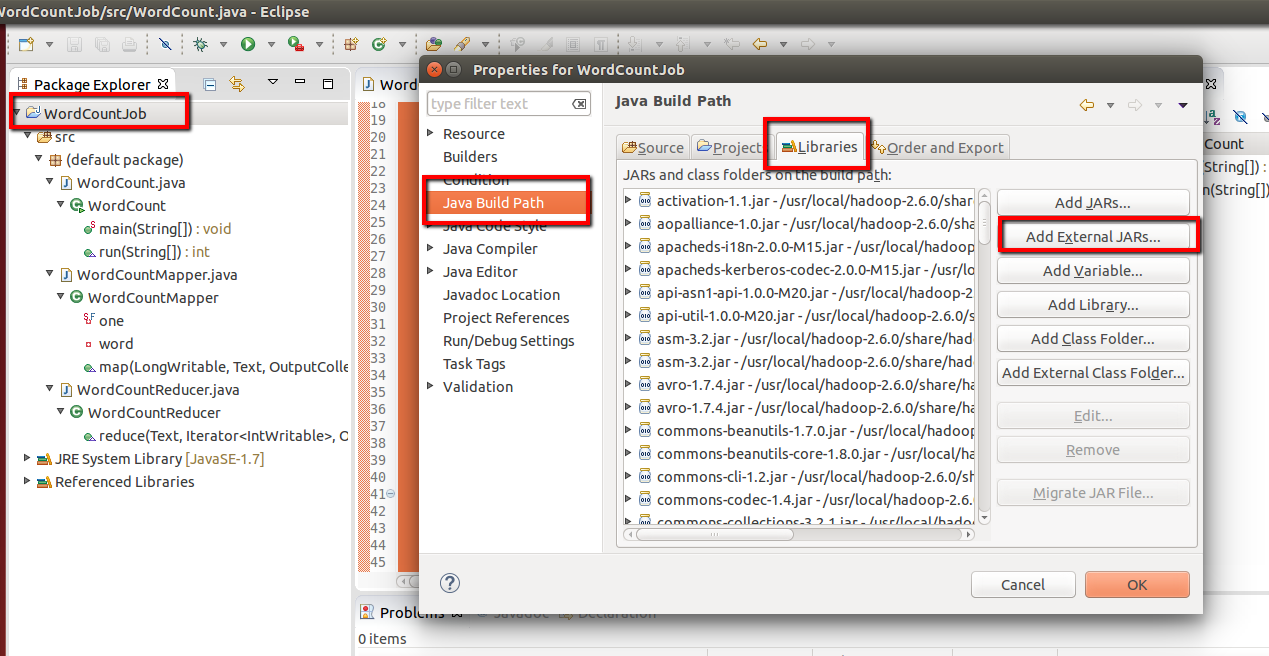
Additionally before step 6,  we have to add dependencies by  adding external libraries from hadoop
Follow the below screenshots and added external jar from path
( in my case its /usr/local/hadoop-2.6.0/share/hadoop/common and /usr/local/hadoop-2.6.0/share/hadoop/mapreduce )

{HADOOP_HOME}/share/hadoop/common
{HADOOP_HOME}/share/hadoop/common/lib
{HADOOP_HOME}/share/hadoop/mapreduce
{HADOOP_HOME}/share/hadoop/yarn
{HADOOP_HOME}/share/hadoop/hdfs


Step 8:
Now Click on the Run tab and click Run-Configurations. Click on New Configuration button and fill the Name, Project Name and Main Class per screen-shots


Step 9:
Now right click on project and  select Export. under Java, select Runnable Jar.
In Launch Config - select the config fie you created in Step 8  (WordCountConfig).
Select an export destination ( lets say desktop.)
Under Library handling, select Extract Required Libraries into generated JAR and click Finish.


Step 10:

- Switch to hduser $sudo su hduser

- Remove temp file generated to gracefully start all required hadoop deamons like namenode, datanode, resourcemange, applicaiton manager, 2ndory Name node.


temp file location is based on tmp file location defined in one of the hadoop configuration file core-site.xml

Step 11: Format name node using below command

#hadoop namenode -format and output will be something like below

Step 12: start process and check if required deamon has been started gracefully or not. Refer below screen and commands for the same

Please note, if temp files are there and not removed, few of deamons will not be started properly. 

Step 13:
Make a hdfs directory ( Note: These directories are not listed when ls is used in the terminal and they are also not visible in the File Browser ) -  hadoop dfs -mkdir -p /usr/local/hadoop-2.6.0/input
Copy the sample input text file into this hdfs directory -   hadoop dfs -copyFromLocal /home/bhupendra/workspace/sample1.txt /usr/local/hadoop-.2.6.0/input
Change directory to run an example Wordcount program using jar file. NOTE: Don't create output folder out1, it  will be created and every time you run an example, give a new directory. These directories are not visible with ls command in terminal.
hadoop jar wordcount.jar /usr/local/hadoop/input /usr/local/hadoop/output

<< I will fix the above issue latter, as this issue causing unable to run hadoop command to create directory and copyfile from local to hdfs director"input"
to run the programme, I have created input directory using usula mkdir command and copied file using cp command >>

Error:
hadoop fs -ls
15/01/30 17:03:49 WARN util.NativeCodeLoader: Unable to load native-hadoop 
ibrary for your platform... using builtin-java classes where applicable
ls: `.': No such file or directory
Fix1
well, your problem regarding ls: '.': No such file or directory' is because there is not home dir on HDFS for your current user. Try
hadoop fs -mkdir -p /user/[current login user]
Then you will be able to hadoop fs -ls
Fix2
go to hadoop conf path
hduser@ubuntu:/usr/local/hadoop-2.6.0/etc/hadoop
vi hadoop-en.sh and add following lines

export HADOOP_PREFIX=/usr/local/hadoop-2.6.0
export HADOOP_HOME=/usr/local/hadoop-2.6.0
export PATH=$PATH:$HADOOP_HOME/bin
export HADOOP_MAPRED_HOME=${HADOOP_HOME}
export HADOOP_COMMON_HOME=${HADOOP_HOME}
export HADOOP_HDFS_HOME=${HADOOP_HOME}
export YARN_HOME=${HADOOP_HOME}
export HADOOP_CONF_DIR=${HADOOP_HOME}/etc/hadoop

< Please note hadoop-env.sh environment variable overrides variables in side .bashrc file. Hence it is mandatory to add above lines in hadoop-env.sh file>

Step 14:
run the job using below command 
hadoop jar WordCount.jar /usr/local/hadoop-2.6.0/input /usr/local/hadoop-2.6.0/output


Step 15
Browse the Hadoop GUI

http://localhost:50070/dfshealth.html#tab-overview

Step 16:
Browse the output file 
http://localhost:50070/explorer.html#/usr/local/hadoop-2.6.0/output

Step 17:
Stop all deamons if you are done with job
http://localhost:8088/cluster

hduser@ubuntu:/usr/local/hadoop-2.6.0/etc/hadoop$ hadoop fs -ls hdfs://localhost:54310
Found 1 items
drwxr-xr-x   - hduser supergroup          0 2015-07-17 10:42 hdfs://localhost:54310/user/hduser/input
hduser@ubuntu:/usr/local/hadoop-2.6.0/etc/hadoop$ 

Hadoop Single Node Setup

System requirement:


1. mkdir /usr/local/hadoop-2.6.0

2. cd /usr/local/hadoop-2.6.0

3. wget http://mirror.metrocast.net/apache/hadoop/common/hadoop-2.6.0/hadoop-2.6.0.tar.gz

4. tar -xzfv hadoop-2.6.0.tar.gz

5. add new user
 
     $ usergroup hadoop
     $ useradd -g hadoop hduser
 to change primary group
usermod -g primarygrpname username
to change secondary group
usermod -G secondarygrpname username

6. Install ssh-server
  $ apt-get install openssh-server

7. generate ssh key
$ su - hduser
$ ssh-key gen
$ cat $HOME/.ssh/id_rsa.pub >> $HOME/.ssh/authorized_keys
$ ssh hduser@localhost


  • Disabling IPv6
  • Open config file: sudo gedit /etc/sysctl.conf
  • Add these 3 lines at the end of the file: 
  • #disable ipv6; net.ipv6.conf.all.disable_ipv6 = 1 net.ipv6.conf.default.disable_ipv6 = 1 net.ipv6.conf.lo.disable_ipv6 = 1
    • after adding the following code, reload the settings  using-  source  ~/.bashrc  and   source  ~/.profile

    • Configuring hadoop Configuration file
            Change directory using cd /usr/local/hadoop/etc/hadoop
       
        $ vi yarn-site.xml
         
    <configuration>
    <property>
    <name>dfs.replication</name>
    <value>1</value>
    <description>Default block replication.
    The actual number of replications can be specified when the file is created.
    The default is used if replication is not specified in create time.
    </description>
    </property>
    </configuration
    • Create direcotry as below
    • Format file system 
    • cd /usr/local/hadoop-2.6.0
    • ./hadoop namenode -format

    • Go to sbin and start all demons
    • cd  /usr/local/hadoop-2.6.0/sbin
    • $ ./start-all.sh
    • to check if all demons are running
    • $jps

    If any daemon doesn't start, start them manually
        hadoop-daemon.sh start namenode
        hadoop-daemon.sh start datanode
        yarn-daemon.sh start resourcemanager
        yarn-daemon.sh start nodemanager
        mr-jobhistory-daemon.sh start historyserver

        Hadoop Web Interfaces.
            Namenode - http://localhost:50070/
            Secondary Namenode - http://localhost:50090
            Most important is jps. Use jps to check which daemons are running.


    $chown -R hduser:hadoop /usr/local/hadoop-2.6.0
    $chmod +x -R /usr/local/hadoop-2.6.0
    Setting Global Variable
    $ vi /home/hduser/.bashrc
    export HADOOP_PREFIX=/usr/local/hadoop-2.6.0
    export HADOOP_HOME=/usr/local/hadoop-2.6.0
    export HADOOP_MAPRED_HOME=${HADOOP_HOME}
    export HADOOP_COMMON_HOME=${HADOOP_HOME}
    export HADOOP_HDFS_HOME=${HADOOP_HOME}
    export YARN_HOME=${HADOOP_HOME}
    export HADOOP_CONF_DIR=${HADOOP_HOME}/etc/hadoop
    # Native Path
    export HADOOP_COMMON_LIB_NATIVE_DIR=${HADOOP_PREFIX}/lib/native
    export HADOOP_OPTS="-Djava.library.path=$HADOOP_PREFIX/lib"
    #Java path
    export JAVA_HOME='/usr/lib/jvm/java-7-oracle'
    # Add Hadoop bin/ directory to PATH

    export PATH=$PATH:$HADOOP_HOME/bin:$JAVA_PATH/bin:$HADOOP_HOME/sbin

    $vi /home/hduser/.profile
    export HADOOP_PREFIX=/usr/local/hadoop-2.6.0
    export HADOOP_HOME=/usr/local/hadoop-2.6.0
    export HADOOP_MAPRED_HOME=${HADOOP_HOME}
    export HADOOP_COMMON_HOME=${HADOOP_HOME}
    export HADOOP_HDFS_HOME=${HADOOP_HOME}
    export YARN_HOME=${HADOOP_HOME}
    export HADOOP_CONF_DIR=${HADOOP_HOME}/etc/hadoop
    # Native Path
    export HADOOP_COMMON_LIB_NATIVE_DIR=${HADOOP_PREFIX}/lib/native
    export HADOOP_OPTS="-Djava.library.path=$HADOOP_PREFIX/lib"
    #Java path
    export JAVA_HOME='/usr/lib/jvm/java-7-oracle'
    # Add Hadoop bin/ directory to PATH

    export PATH=$PATH:$HADOOP_HOME/bin:$JAVA_PATH/bin:$HADOOP_HOME/sbin

    $/usr/local/hadoop-2.6.0/etc/hadoop/hadoop-env.sh
    export JAVA_HOME=/usr/lib/jvm/java-7-oracle


         <configuration>
    <!-- Site specific YARN configuration properties -->
    <property>
    <name>yarn.nodemanager.aux-services</name>
    <value>mapreduce_shuffle</value>
    </property>
    <property>
    <name>yarn.nodemanager.aux-services.mapreduce.shuffle.class</name>
    <value>org.apache.hadoop.mapred.ShuffleHandler</value>
    </property>
    </configuration>

    $vi core-site.xml
    <configuration>
    <property>
      <name>hadoop.tmp.dir</name>
      <value>/usr/local/hadoop-2.6.0/tmp</value>
      <description>A base for other temporary directories.</description>
    </property>

    <property>
      <name>fs.default.name</name>
      <value>hdfs://localhost:54310</value>
      <description>The name of the default file system.  A URI whose
      scheme and authority determine the FileSystem implementation.  The
      uri's scheme determines the config property (fs.SCHEME.impl) naming
      the FileSystem implementation class.  The uri's authority is used to
      determine the host, port, etc. for a filesystem.</description>
    </property>

    </configuration>

    $  vi mapred-site.xml
    <configuration>
    <property>
      <name>mapred.job.tracker</name>
      <value>localhost:54311</value>
      <description>The host and port that the MapReduce job tracker runs
      at.  If "local", then jobs are run in-process as a single map
      and reduce task.
      </description>
    </property>

    </configuration>

    $ vi hdfs-site.xml
    mkdir -p $HADOOP_HOME/yarn_data/hdfs/datenode
    mkdir -p $HADOOP_HOME/yarn_data/hdfs/namenode

    Offline Image Viewer Guide

    -rw-r--r-- 1 hduser hadoop  100722 Oct  7 20:49 fsimage_0000000000000008804
    -rw-r--r-- 1 hduser hadoop      62 Oct  7 20:49 fsimage_0000000000000008804.md5
    drwxrwxr-x 3 hduser hduser    4096 Oct  8 22:49 ..
    -rw-r--r-- 1 hduser hadoop  100722 Oct  8 22:49 fsimage_0000000000000008805
    -rw-r--r-- 1 hduser hadoop      62 Oct  8 22:49 fsimage_0000000000000008805.md5
    -rw-rw-r-- 1 hduser hduser     202 Oct  8 22:49 VERSION
    -rw-r--r-- 1 hduser hadoop       5 Oct  8 22:49 seen_txid
    -rw-r--r-- 1 hduser hadoop 1048576 Oct  8 22:49 edits_inprogress_0000000000000008806
    drwxrwxr-x 2 hduser hduser   12288 Oct  8 22:49 .
    hduser@ubuntu:/usr/local/hadoop-2.6.0/tmp/dfs/name/current$ cat fsimage_0000000000000008805.md5
    929bde84fb1432baba3228dc78b3b6d8 *fsimage_0000000000000008805
    hduser@ubuntu:/usr/local/hadoop-2.6.0/tmp/dfs/name/current$ hdfs oiv -i fsimage_0000000000000008805
    15/10/08 23:02:31 INFO offlineImageViewer.FSImageHandler: Loading 2 strings
    15/10/08 23:02:31 INFO offlineImageViewer.FSImageHandler: Loading 1273 inodes.
    15/10/08 23:02:31 INFO offlineImageViewer.FSImageHandler: Loading inode references
    15/10/08 23:02:31 INFO offlineImageViewer.FSImageHandler: Loaded 0 inode references
    15/10/08 23:02:31 INFO offlineImageViewer.FSImageHandler: Loading inode directory section
    15/10/08 23:02:31 INFO offlineImageViewer.FSImageHandler: Loaded 164 directories
    15/10/08 23:02:31 INFO offlineImageViewer.WebImageViewer: WebImageViewer started. Listening on /127.0.0.1:5978. Press Ctrl+C to stop the viewer.
    15/10/08 23:04:27 INFO offlineImageViewer.FSImageHandler: 200 method=GET op=GETFILESTATUS target=/user/hduser
    15/10/08 23:04:27 INFO offlineImageViewer.FSImageHandler: 200 method=GET op=LISTSTATUS target=/user/hduser
    15/10/08 23:04:51 INFO offlineImageViewer.FSImageHandler: 200 method=GET op=GETFILESTATUS target=/user/hduser
    15/10/08 23:04:51 INFO offlineImageViewer.FSImageHandler: 200 method=GET op=LISTSTATUS target=/user/hduser
    15/10/08 23:05:41 INFO offlineImageViewer.FSImageHandler: 200 method=GET op=GETFILESTATUS target=/user/hduser
    15/10/08 23:05:42 INFO offlineImageViewer.FSImageHandler: 200 method=GET op=LISTSTATUS target=/user/hduser
    15/10/08 23:05:42 INFO offlineImageViewer.FSImageHandler: 200 method=GET op=LISTSTATUS target=/user/hduser/input
    15/10/08 23:05:42 INFO offlineImageViewer.FSImageHandler: 200 method=GET op=LISTSTATUS target=/user/hduser/input1
    15/10/08 23:05:42 INFO offlineImageViewer.FSImageHandler: 200 method=GET op=LISTSTATUS target=/user/hduser/input2
    15/10/08 23:05:42 INFO offlineImageViewer.FSImageHandler: 200 method=GET op=LISTSTATUS target=/user/hduser/input3
    15/10/08 23:06:47 INFO offlineImageViewer.FSImageHandler: 200 method=GET op=LISTSTATUS target=/